 |
vs1053_avr_renesas_uno 0.1.0
Arduino Library for VS1053 shield
|
|
vs1053_avr_renesas_uno 0.1.0
Arduino Library for VS1053 shield
|
Copyright © 2025 Kaled Souky. All rights reserved.
This project is licensed under the terms of the GNU General Public License v3.
You can find the full license text in the LICENSE.txt file included in this repository.
For more details, visit the official GNU General Public License website.
Developed by Kaled Souky in 2025, the vs1053_avr_renesas_uno library is an Arduino port of the vs1053_SdFat library, originally created by Michael P. Flaga in 2012.
The vs1053_avr_renesas_uno library is a real-time, non-blocking, interrupt-driven library designed for VLSI’s VS10xx series (specifically, the VS1053). It uses the SPI bus for controller/peripheral communication, where the microcontroller on the Arduino board (or compatible) acts as the main processor (controller) and the VS1053 as a coprocessor (peripheral), responsible for decoding and playing audio files in formats such as Ogg Vorbis, MP3, AAC, WMA, FLAC, WAV, and MIDI.
The Arduino UNO R4 introduces a significant leap in processing power, speed, and memory. With its ARM Cortex-M4 architecture, 48 MHz clock speed, 32 kB of SRAM, and 256 kB of flash memory, this board delivers a substantial improvement in SPI controller/peripheral communication speed, enabling smoother and more efficient interaction with peripherals.
This is particularly important because the Renesas RA4M1 ARM Cortex-M4 microcontroller acts as the main processor (controller), managing the core logic of the program, while the VS1053 chip functions as a coprocessor (peripheral) dedicated to audio decoding and playback.
These advancements unlock new possibilities in project development, such as:
The VS1053 chip, featured in the SparkFun MP3 player shield or other compatible MP3 player shields, is widely regarded as an excellent choice for audio decoding and playback. It delivers exceptional performance, particularly when compared to alternatives such as the YX5200-24SS chip used in the DFPlayer Mini MP3 player or the MY1690X chip found in other modules. What sets the VS1053 apart are its superior features, including:
buttonplayer and portable MP3 player examples, the Bounce2 library eliminates switch bounce, improving stability in pulse detection.webplayer example included in this library, the Ethernet library provides compatibility with Arduino Ethernet Shield, Ethernet Shield Rev2, and other W5100 or W5500-based Ethernet shields, as long as they maintain the same form factor, pin configuration, and operating voltage.The SdFat library enforces a slightly restricted format for short filenames, following the legacy 8.3 naming convention inherited from DOS and the FAT file system. This means filenames are limited to 8 characters, followed by a dot (.), and an extension of up to 3 characters. This constraint is integral to the FAT directory structure, where each entry has a fixed size, optimizing both access speed and memory usage. By adhering to this format, file location calculations become more efficient, reducing fragmentation and lowering CPU load during file system operations. For example, you can name your files track001.mp3, track002.mp3, track003.mp3, ..., but not MyMusicPlaylist.mp3, as it exceeds the character limit. Maintaining this structure ensures compatibility with FAT-based storage systems and enhances performance in resource-constrained environments, such as embedded systems.
SdFat library provides the SdFormatter example, a tool designed to properly format SD cards in FAT16 or FAT32. You can use other formatting applications or tools, as long as they adhere to the appropriate specifications for SD cards. They must ensure proper sector alignment, preserve the FAT16 or FAT32 structure without improper modifications, and optimize read/write performance. SdFormatter follows the SD Association's guidelines, ensuring a properly formatted SD card for optimal performance.The VS10xx chips are DSPs that run firmware from an internal ROM. Additionally, the VSdsp's RAM can also be loaded with external firmware (known as patches or plugins) and executed via the SPI port. This allows the VSdsp to troubleshoot factory ROM firmware or add new features available on the VLSI website. It's even possible to write custom VSdsp code using its Integrated Development Tools (VSIDE).
vs_plg_to_bin.pl is a perl script, that is provided in this library to run on your PC, to read and digest the .plg files converting them to raw binary as to be read by vs1053::VSLoadUserCode() from the SD card. Allowing updates to the VSDsp into its volatile memory after each reset. These updates may be custom features or accumulated patches.
By storing them on the SdCard these plug-ins do not consume the Arduino's limited Flash spaces.
Below are pre-compiled binary's of corresponding provided VSLI patches/plugins. Filenames are kept short since the SD card supports only the 8.3 naming convention.
| Zip Folder | PLG File | Binary File |
|---|---|---|
vs1053-pcm140b.zip | vs1053pcm.plg | pcm.053 |
vs1053b-admix130.zip | admix-left.plg admix-mono.plg admix-right.plg admix-stereo.plg admix-swap.plg | admxleft.053 admxmono.053 admxrght.053 admxster.053 admxswap.053 |
vs1053b-eq5-100.zip | vs1053b-eq5.plg | eq5.053 |
pitchshifter131.zip | pitchshifter131/code/ps1053b.plg | pshift.053 |
| Zip Folder | PLG File | Binary File |
|---|---|---|
vs1053b-patches290.zip | vs1053b-patches-flac.plg vs1053b-patches.plg vs1053b-patches-latm.plg vs1053b-patches-flac-latm.plg vs1053b-patches-dsd.plg | patchesf.053 patches.053 patchesl.053 patchefl.053 patchesd.053 |
vs1053b-rtmidistart.zip | rtmidistart.plg | rtmidi.053 |
plugins_and_patches folder and must be placed in the root directory of the SD card to function correctly. The cumulative update patches.053, which resolves numerous known issues, is applied during the vs1053::vs_init initialization routine. VLSI periodically publishes updates on its software support page. To compile vs_plg_to_bin.pl script included in the same folder. Example usage: Linux: perl vs_plg_to_bin.pl vs1053pcm.plg pcm.053 Windows: vs_plg_to_bin.pl .\vs1053pcm.plg .\pcm.053Perl is available natively on Linux and can be downloaded for Windows from ActivePerl.
admx____.053) please note Limitations of the VS1053 as an SPI Peripheral.The Arduino UNO R4 Minima and UNO R4 WiFi maintain the same form factor, pin layout, and 5V operating voltage as their predecessor, the UNO R3. This ensures full compatibility with the SparkFun MP3 Player Shield and the vs1053_avr_renesas_uno library, eliminating any risk of incompatibility or damage to the components.
Although the Arduino Nano R4 has a different physical format, it shares the same pin assignment, and 5V operating voltage as the Arduino UNO R4 Minima and WiFi. Therefore, the same pin numbering can be used to connect to the MP3 Player Shield via jumper wires.
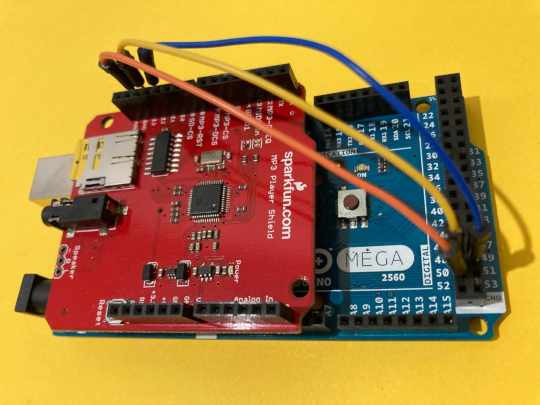
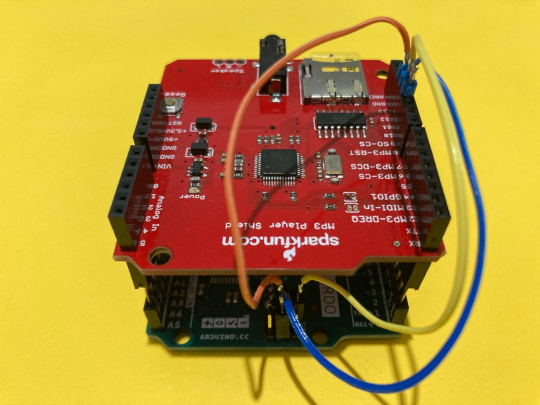
The Arduino Mega and Leonardo compatibility requires additional jumpers. Since the SPI pins are not located at the same positions as on the Arduino UNO R3 or UNO R4, when using a Mega or Leonardo with a SparkFun MP3 Player Shield or other compatible MP3 Player Shields.
The following pins must be connected.
| Mega Pin | Conexión | MP3 Player Pin |
|---|---|---|
| D51 (MOSI/COPI) | ────► | D11 (MOSI/COPI) |
| D50 (MISO/CIPO) | ────► | D12 (MISO/CIPO) |
| D52 (SCLK/SCK) | ────► | D13 (SCLK/SCK) |
| Leonardo ICSP | Conexión | MP3 Player Pin |
|---|---|---|
| ICSP4 (MOSI/COPI) | ────► | D11 (MOSI/COPI) |
| ICSP1 (MISO/CIPO) | ────► | D12 (MISO/CIPO) |
| ICSP3 (SCLK/SCK) | ────► | D13 (SCLK/SCK) |
portable_mp3_player_UNO_R4 example is compatible with the Arduino UNO R4 (Minima, WiFi, and Nano). It is not compatible with Arduino boards based on the AVR architecture (e.g., UNO R3, Mega R3, Nano, Leonardo, Micro) due to limited memory and processing power. In the case of the Arduino Mega R3, although it has sufficient memory, its limited CPU cannot establish ISP communication with the VS1053 and the SD card while simultaneously rendering the cassette animation and updating all information on the OLED via I²C.webplayer example. This limitation also applies to other ATmega32U4-based boards, such as the Teensy 2.0 and the conductive touch board (BARETOUCH).When using the portable_mp3_player example, I²C communication must be handled via the microcontroller’s dedicated hardware to control the OLED display. On the Arduino Leonardo, the only available I²C port corresponds to pins D2 (SDA) and D3 (SCL), which conflicts with the SparkFun MP3 Player Shield. This is because the MP3-DREQ pin of the VS1053 chip—responsible for indicating when the audio chip is ready to receive more data—is connected to pin D2.
This conflict prevents the use of interrupts or software polling to detect the MP3-DREQ status. Implementing software I²C is not recommended due to the low refresh rate of the display, which would negatively affect the fluidity of the OLED interface.
To use the Leonardo board with the SparkFun MP3 Player Shield in these cases, jumpers must be used and the pin assignments reconfigured in the vs1053_avr_renesas_uno_config.h file, ensuring that pins D2 (SDA) and D3 (SCL) are reserved exclusively for the OLED display.
Support for Teensy 2.0 board please see TEENSY2
The SparkFun MP3 Player Shield should work seamlessly out of the box with an Arduino UNO R3 (or compatible), as well as the UNO R4 Minima and UNO R4 WiFi.
Support for Seeeduino Music Shield please see SEEEDUINO and may require additional libraries, as per Requirements
Support for Gravitech MP3-4NANO shield please see GRAVITECH
For the portable MP3 player examples, the popular 0.96 OLED display with an I²C interface (featuring the SSD1306 or SSD1315 chip) is used. Although the SSD1315 chip is not explicitly listed among the types defined in the OLED display configuration constructor of the U8g2 library, it is fully compatible with the SSD1306 type.
After experimental testing, some cases of incompatibility were identified. One such case involves the display Grove - OLED Display 0.96 (SSD1315) I²C Interface Compatible with Arduino.
While this display is fully compatible with the dedicated I²C hardware of the Arduino UNO R4, it does not work directly with AVR-based Arduino boards. To use the U8g2 library in these cases, 1 kΩ pull-up resistors must be added to the SCL and SDA pins. This allows the HW_I2C constructor to initialize the communication protocol using dedicated I²C hardware, enabling high communication speeds.
U8g2 library, is not recommended. Emulating I²C via software consumes valuable CPU cycles to manage communication, rather than leveraging dedicated hardware. This approach is less efficient, reduces communication speed, and negatively impacts the fluidity of display handling.playTrack or playMP3, while maintaining real-time execution flow without interruptions. demo has these lines commented out in setup(). To activate them, simply uncomment the lines. Since each byte transmitted to the VS1053 must also be read from the SD card via the shared SPI bus, the bus efficiency is reduced to less than half, introducing overhead. This overhead can significantly constrain real-time availability, particularly when dealing with high-bitrate audio files. Additionally, features like the Playback Speed Multiplier can rapidly consume available processing time.
Most Arduino boards based on 8-bit AVR microcontrollers operate at a clock frequency of 16 MHz, while the Arduino Uno R4 Minima and R4 WiFi boards, based on the 32-bit Renesas RA4M1 ARM architecture, run at 48 MHz.
In SPI communication, the data transfer speed is determined by the architecture of both the controller and the peripheral, as well as the clock frequency at which they operate. In this case, the VS1053, a DSP specialized in audio processing, uses a 12.288 MHz crystal, allowing stable maximum speeds of 4 MHz when used with 16 MHz AVR microcontrollers, and 7.9 MHz in the case of the 48 MHz Renesas RA4M1.
This makes it possible to have sufficient real-time execution for properly handling SD card reading tasks and transmitting high-bitrate data to the VS1053, as well as performing other demanding tasks like the playback speed multiplication function, without imposing an overhead on the CPU.
Although the Arduino Uno R3, with its 16,000,000 MIPS and an optimal SPI communication speed, is capable of handling these tasks well, the new Arduino Uno R4, with 48,000,000 MIPS and a higher SPI communication speed, stands out in this aspect. Its greater number of available CPU cycles allows it to execute more tasks with ease, dedicating its 32-bit computing capacity to the execution of the required operations without overloading the CPU. This enables it to handle audio files with a higher bitrate, which translates to superior performance and greater efficiency.
The actual CPU usage can be measured by defining PERF_MON_PIN on a valid pin, which generates a low signal on the configured pin when servicing the VSdsp. This includes SD card reads.
SdFat library, the SD card read and write speed can be individually set using the SPI_HALF_SPEED and SPI_FULL_SPEED macros in the sd.begin() argument. This contributes to flexibility in using SD cards available on the market, which may perform better at one speed or another, while also optimizing real-time execution efficiency.The below is a list of basic questions to ask when attempting to determine the problem.
demo and fileplayer examples in the vs1053_avr_renesas_uno library should initially provide an opening print indicating the amount of available SRAM and full menu help. If this output does not appear, the issue likely stems from communication between your target board and the IDE, rather than from this library.SdFat::begin() to be initialized in the setup() function of sketch, as shown in the following example. This allows more immediate access to SD card files from the main sketch. However, if this initialization is not performed, it won't trigger an immediate compilation error, but the sketch will freeze when vs1053::begin() is called.QuickStart example from the SdFat library to verify whether the card is accessible. Additionally, SdInfo, another example from the SdFat library, can indicate whether the card can be mounted. If formatting is required, FAT16 or FAT32 should be used, and SdFormatter—also part of the SdFat library—can handle this process for you.demo and fileplayer examples display the remaining available RAM rather than the statically allocated amount, as actual availability depends on factors such as the processor, IDE version, and libraries used. On an Arduino Uno R3 compiled with IDE version 2.3.5, the demo example should show approximately 978 bytes of free RAM, while fileplayer would reduce that figure to 832 bytes. Meanwhile, on an Uno R4, which has greater RAM capacity, demo should reflect around 26,412 bytes available and fileplayer close to 26,404 bytes.SdFat Library as to retrieve the stream of audio data from the SD card. Notably this is where most failures occur. Some SD card types and manufacturers may not be supported by SdFat. Though SdFat Lib is at this time, supporting most known cards. Error codes are typically returned by this library's objects in place of Serial.print messages to both conserve flash memory and accommodate situations where serial devices may not always be present. It is the responsibility of the calling sketch to appropriately handle these codes or display corresponding messages.
The following error codes are returned by the vs1053::begin() member function.
 0 OK
 1 *Failure of SdFat to initialize physical contact with the SdCard
 2 *Failure of SdFat to start the SdCard's volume
 3 *Failure of SdFat to mount the root directory on the volume of the SdCard
 4 Other than default values were found in the SCI_MODE register.
 5 SCI_CLOCKF did not read back and verify the configured value.
 6 Patch was not loaded successfully. This may result in playTrack errors
sd.begin() as global, starting version 1.1.0The following error codes return from the vs1053::playTrack() or vs1053::playMP3() member functions.
 0 OK
 1 Already playing track
 2 File not found
 3 indicates that the VSdsp is in reset.
The following error codes return from the vs1053::skipTo() member function.
 0 OK
 1 Not Playing track
 2 Failed to skip to new file location
The vs1053_avr_renesas_uno library is not included in the standard Arduino distribution. To use it, you need to clone or download it from this repository and install it manually.
There are two methods to install the library:
libraries folder of your Arduino IDE installation.
 1.14.0